Route
A Swift iOS ride booking concept for planning trips, checking fares, confirming payment, and tracking rides.

Route
Plan, price, and track rides with a clear map flow.
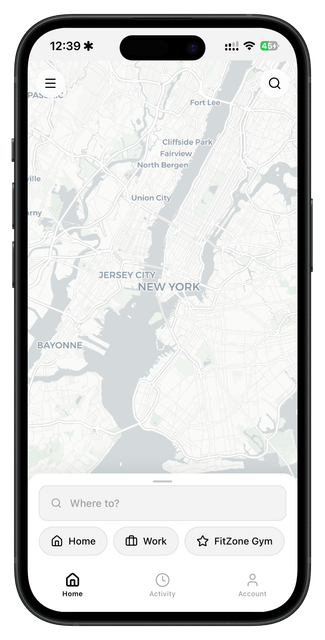
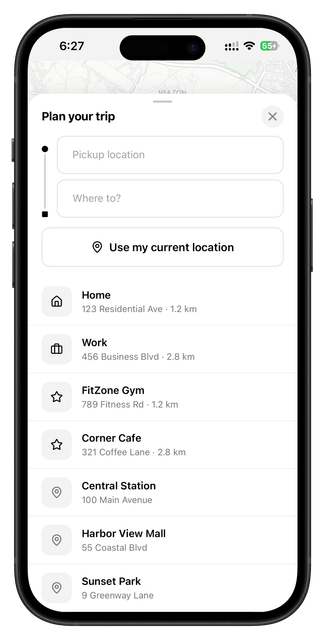
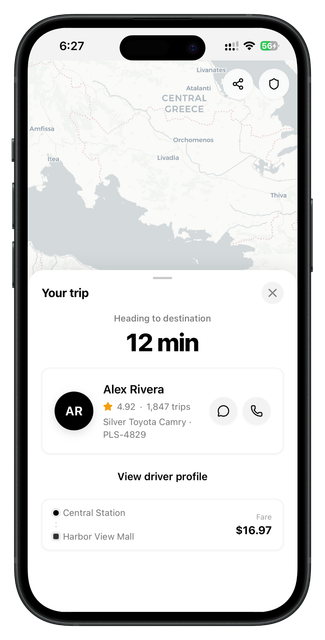
Route is a ride booking concept focused on quick decisions and clear trip planning. The app uses a map-first interface with bottom sheets for destination search, saved places, fare estimate, payment review, and active trip status.
The idea was to keep the ride flow direct and practical. Ride apps are used when people need to move fast, so the design keeps the map visible, the destination flow short, and the price information easy to understand before confirmation.
The user begins on a map screen, opens the planner, selects pickup and drop-off locations, checks the fare estimate, confirms payment, and then follows the active trip with driver and route information. Each screen supports one decision at a time.
The design uses black for important actions, white panels for controls, soft gray map surfaces, muted blue-gray map labels, and neutral secondary text. The style is minimal, utility-focused, and built around clarity.
This concept was planned for Swift and SwiftUI using map containers, bottom-sheet layouts, saved place rows, fare breakdown cards, payment rows, and active ride panels. The design took around 3–4 days.
The flow is designed for speed: open the map, plan a trip, view the fare estimate, confirm payment, and track the active ride.
Product thinking
Problem
Ride booking flows can feel stressful if the user cannot quickly understand route, fare, payment, and trip status.
Solution
The solution is a map-first interface with focused bottom sheets that show only the next important decision.
Target user
Users who need quick ride planning, clear fare information, saved places, and active trip tracking.
Key features
User flow diagram
Map
Start from current location and nearby routes.
Plan
Enter pickup, destination, and saved places.
Fare
Review price, payment, and trip options.
Track
Follow active ride and driver status.
App structure
Design summary
Map home, plan trip, fare estimate, active trip.
Map clarity, bottom-sheet UI, fast destination input, price confidence, and active ride tracking.
Minimal, direct, functional, trustworthy, modern, and fast.