FitZone
A Swift iOS fitness concept for activity rings, health metrics, sleep tracking, and workout discovery.


FitZone
Activity, sleep, and workouts in a clean daily dashboard.
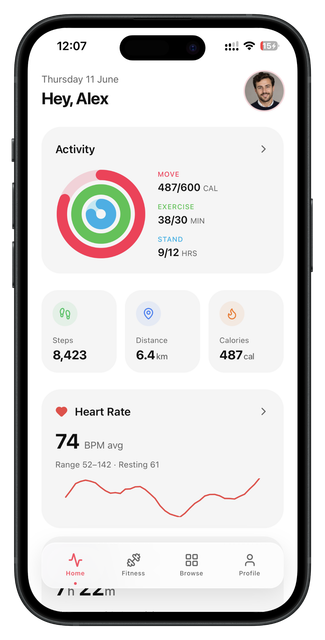
FitZone is a fitness dashboard concept designed to make health data feel readable, organized, and motivating. The app focuses on daily activity, movement, exercise, standing progress, sleep, recent workouts, and workout browsing without making the user feel overloaded.
The idea was to create a dashboard that gives quick feedback first, then lets users go deeper only when they want more detail. Instead of putting every metric on one screen, the concept separates dashboard, sleep, activity, and workouts into clear sections.
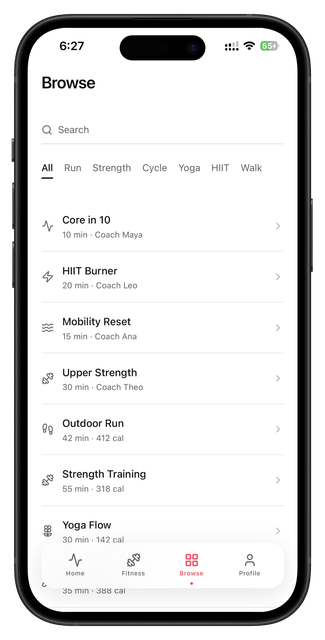
The user starts on a home dashboard with rings, step count, distance, calories, and heart rate. They can move into a sleep and workouts screen, review weekly activity metrics, or browse workout types. Each screen has one main purpose so the app feels easy to scan.
The design is based on colorful activity data: red for movement, green for exercise, blue for standing, purple for sleep, and soft gray cards for structure. The UI stays light and minimal so the colors highlight progress instead of overwhelming the layout.
This concept was planned for Swift and SwiftUI using reusable stat cards, activity rings, progress bars, metric rows, workout cards, and bottom navigation. The design took around 3 days.
The flow is designed around daily use: view dashboard, check sleep and recent workouts, review activity metrics, and browse workouts.
Product thinking
Problem
Fitness apps can feel too technical when they show too much health data without a clear visual structure.
Solution
The solution is a simple dashboard system that breaks health information into readable cards and clear progress visuals.
Target user
Users who want to track daily activity, sleep, workouts, and progress without a complicated fitness interface.
Key features
User flow diagram
Dashboard
View activity rings and daily stats.
Sleep
Check sleep and recent workouts.
Metrics
Review weekly activity progress.
Browse
Find workout types and routines.
App structure
Design summary
Home dashboard, sleep and recent workouts, activity metrics, browse workouts.
Readable data, progress visualization, soft dashboard cards, and simple workout discovery.
Fresh, focused, healthy, clean, motivating, and organized.